仿iPhone开关式按钮(jQuery+CSS3)
仿iPhone开关式按钮(jQuery+CSS3)
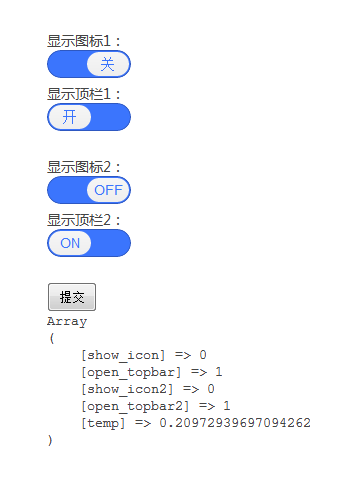
001 <!DOCTYPE html>
002 <html>
003 <head>
004 <meta http-equiv="Content-Type" content="text/html; charset=utf-8" />
005 <meta name="author" content="pandao QQ:272383090" />
006 <title>仿iPhone开关式按钮(jQuery+CSS3)</title>
007 <style type="text/css">
008 *{margin:0;padding:0;}
009 body{font-size:14px;color:#444;font-family:"微软雅黑",Arial;background:#fff;padding:50px;}
010 a{color:#444;text-decoration: none;}
011 a:hover{color:#065BC2;text-decoration: none;}
012 .clear{clear:both;}
013 img{border:none;vertical-align: middle;}
014 ul{list-style: none;}
015 .mwui-switch-btn{
016 width:84px;
017 display:block;
018 padding:1px;
019 background:#3B75FD;
020 overflow:hidden;
021 margin-bottom:5px;
022 border:1px solid #2E58C1;
023 border-radius:18px;
024 cursor: pointer;
025 }
026 .mwui-switch-btn span{
027 width:32px;
028 font-size:14px;
029 height:18px;
030 padding:4px 5px 2px 5px;
031 display:block;
032 filter:progid:DXImageTransform.Microsoft.gradient(startColorstr=#f6f6f6,endColorstr=#eeeeee,grandientType=1);
033 background:-webkit-gradient(linear, 0 0, 0 100%, from(#f6f6f6), to(#eeeeee));
034 background:-moz-linear-gradient(top, #f6f6f6, #eeeeee);
035 border-radius:18px;
036 float:left;
037 color:#3B75FD;
038 text-align:center;
039 }
040 .mwui-switch-btn:hover span{
041 background:#fff;
042 }
043 .mwui-switch-btn span.off{float:right;}
044 input[type='submit']{padding:5px 10px;cursor: pointer;}
045 </style>
046 </head>
047 <body>
048 <form method="post">
049 显示图标1:<button class="mwui-switch-btn"><span change="开" class="off">关</span><inputtype="hidden" name="show_icon" value="0" /></button>
050 显示顶栏1:<button class="mwui-switch-btn"><span change="关">开</span><input type="hidden" name="open_topbar" value="1" /></button>
051 <br />
052 显示图标2:<button class="mwui-switch-btn"><span change="OFF">ON</span><input type="hidden" name="show_icon2" value="1" /></button>
053 显示顶栏2:<button class="mwui-switch-btn"><span change="ON" class="off">OFF</span><input type="hidden" name="open_topbar2" value="0" /></button>
054 <br />
055 <input type="submit" id="submit" value="提交" />
056 </form>
057 <div id="debuger"></div>
058 <script type="text/javascript" src="http://code.jquery.com/jquery-1.6.4.min.js"></script>
059 <script type="text/javascript">
060 $(function() {
061 $('.mwui-switch-btn').each(function() {
062 $(this).bind("click", function() {
063 var btn = $(this).find("span");
064 var change = btn.attr("change");
065 btn.toggleClass('off');
066
067 if(btn.attr("class") == 'off') {
068 $(this).find("input").val("0");
069 btn.attr("change", btn.html());
070 btn.html(change);
071 } else {
072 $(this).find("input").val("1");
073 btn.attr("change", btn.html());
074 btn.html(change);
075 }
076
077 return false;
078 });
079 });
080
081 $("#submit").click(function() {
082 var form = $(this).parent()[0];
083 var inputs = form.getElementsByTagName('input');
084 var params = [];
085 $('#debuger').html('');
086
087 for (var i=0; i < inputs.length; i++) {
088 params.push(inputs[i].name+"="+inputs[i].value);
089 }
090
091 $.post("post.php", params.join("&")+"&temp="+Math.random(), function(data) {
092 $('#debuger').html(data);
093 });
094
095 return false;
096 });
097 });
098 </script>
099 </body>
100 </html>